

Your LP positions
If you have open LP positions, a Your LP positions strip appears above the browser. Each card shows the pair, the venue, whether the position is in range, its value, PnL and fees earned. Click a card to open its pool. The strip doesn’t appear when you have no open positions.Browsing pools
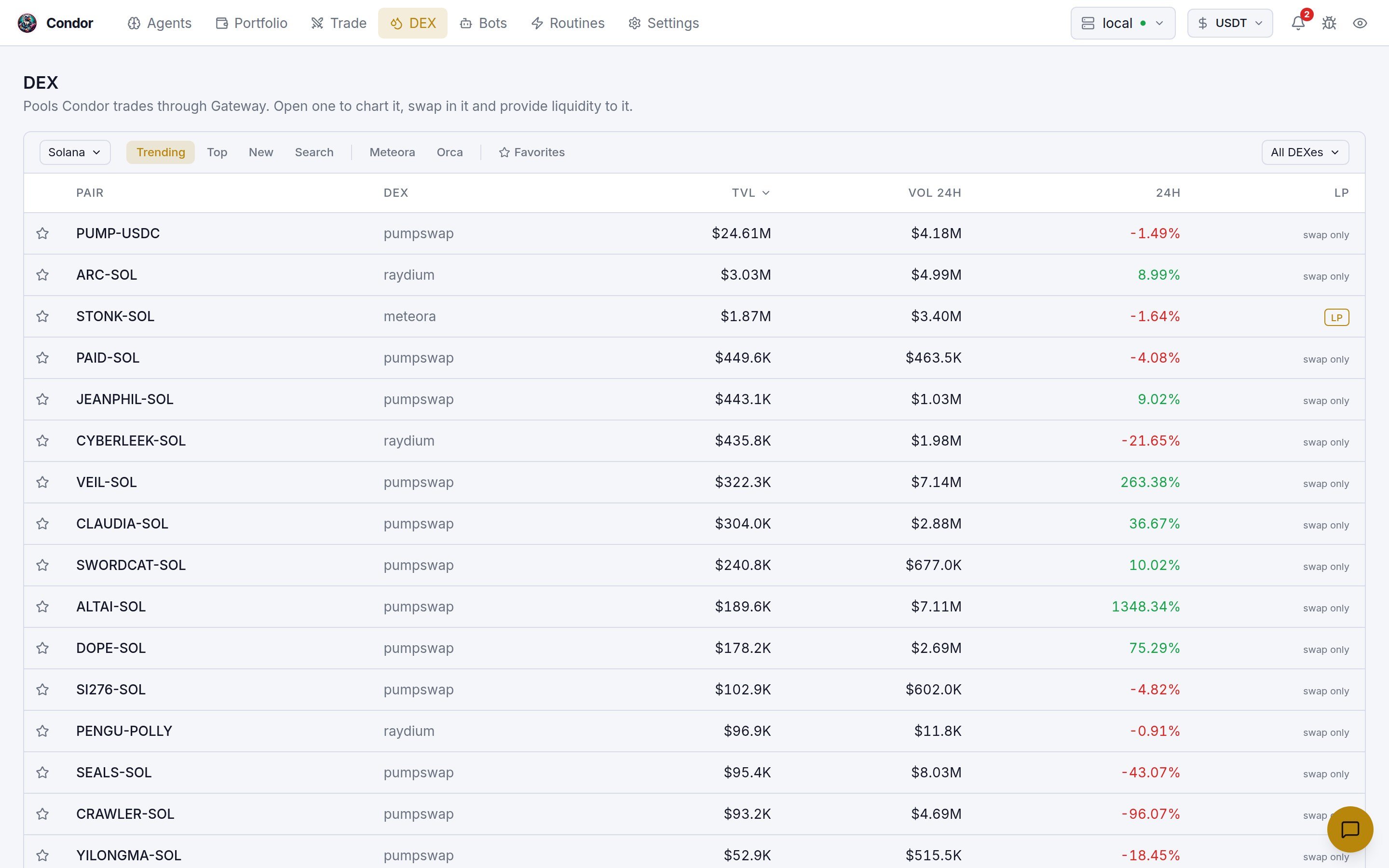
- Network selector: the chain to browse. The list comes from your Gateway: only networks it’s configured for that GeckoTerminal also indexes, with testnets dropped. When there’s only one chain, the selector is hidden.
- Trending, Top and New list the chain’s pools from GeckoTerminal. The All DEXes filter narrows them to one or more DEXes.
- Search takes an address only. Paste a pool address to get an Open pool link, or a token address to list its pools. Searching by ticker is not supported.
- Meteora and Orca (Solana only) list pools from those venues directly. These tabs add Fee/TVL, APY and Bin (bin step) columns, and their search box filters pools by name.
- Favorites lists pools you’ve starred. Click the star on any row to add or remove one. Favorites are saved in your browser.
Inside a pool
Click a row to open the pool page.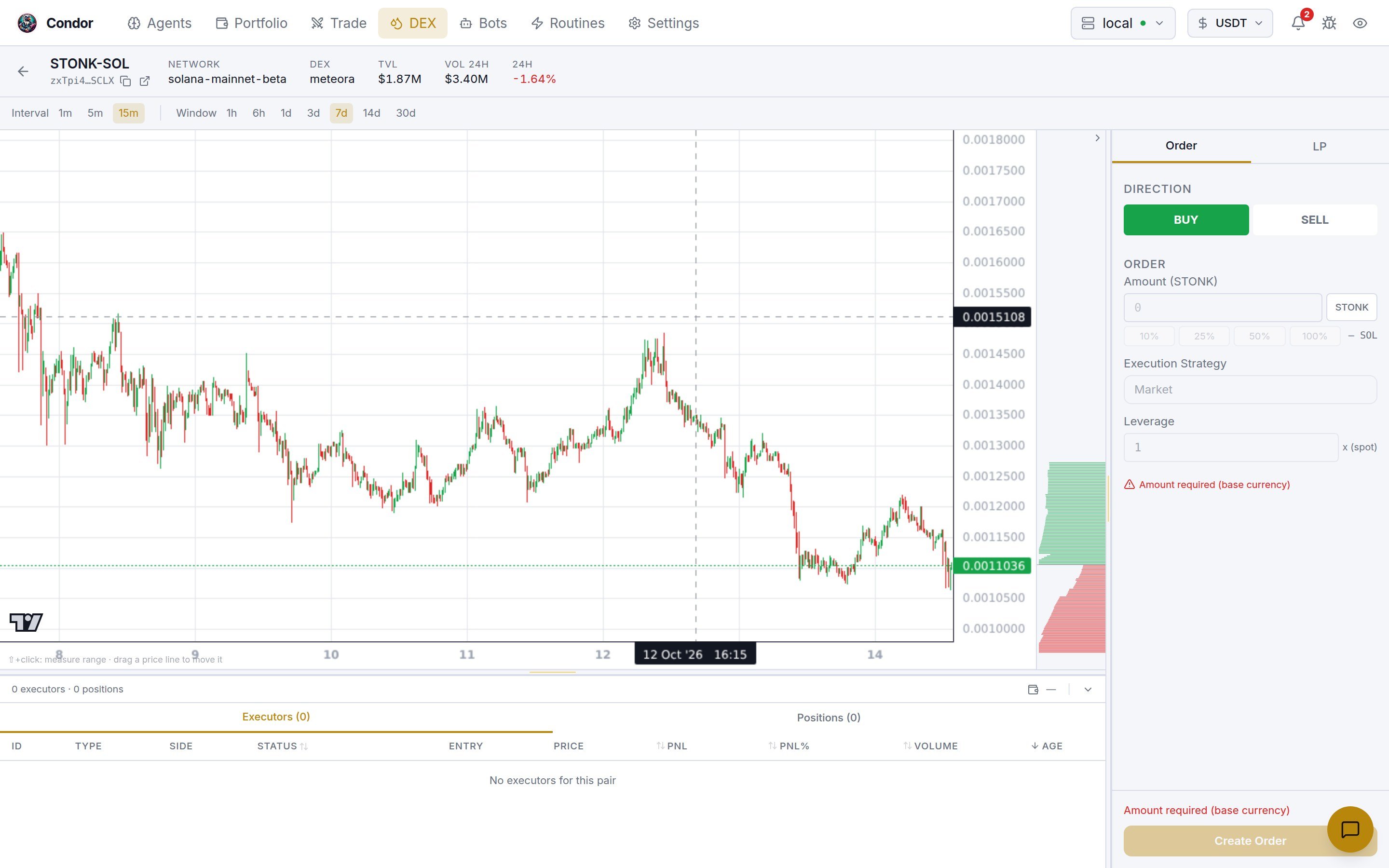
- Header: the pair, pool address, network, DEX, TVL, 24h volume and 24h change.
- Interval (
1m,5m,15m) and Window (1hto30d) for the chart. - Position bar: if you have an LP position in this pool, a bar above the chart shows whether it’s in range, its bounds, where the price sits between them, its value, fees and PnL. Click it to highlight the position on the chart.
- Liquidity depth: on pools where Condor can read liquidity bins from Gateway (Solana pools such as Meteora), a column beside the chart shows where liquidity sits, on the same price scale. The range you’re setting is drawn across it. Use the arrow to hide or show it.
- The bottom pane lists executors and positions in this pool, as on the Trade page.
Order and LP tabs
The side panel has two tabs:- Order swaps in the pool. It creates an order executor with direction, amount and the Market strategy, the only one a DEX supports. Click Create Order.
- LP opens a concentrated-liquidity position in this pool. It appears only when the pool is on a CLMM venue Condor supports. Choose the side (Range, Buy or Sell), set the price range (drag its lines on the chart if you like), optional auto-close limits, the amounts and Keep Position. Meteora pools also take a strategy. Click Create LP Position.
/lp menu.
Supported LP venues
You can open a position in pools on these venues (condor/pool_data.py):
Pools on other venues, including plain AMMs and Uniswap v4, show swap only.
Using Telegram
/trade(or/swap): the DEX side of the trading menu. Pick the network and pair, tap 📋 Quote, then ✅ Execute./lp: the liquidity menu. Browse Meteora, Orca and GeckoTerminal pools, open a position, view your positions, collect fees (one position, or 🎁 Collect All) and close positions./gateway: Gateway status, connectors, wallets, networks, pools and tokens.
Using Hummingbot API
The Workspace creates LP positions as executors throughPOST /executors/. See LP Executor. The API also exposes Gateway’s CLMM operations directly under /gateway/clmm/*, including open, add, remove, collect-fees, close and positions_owned, and pool discovery at GET /gateway/clmm/pools. See the API reference.
Learn more
- LP Executor: how a position is opened, tracked and closed
- Guide: Solana DEX LP Expert Agent: an agent that rotates LP positions for you