> ## Documentation Index
> Fetch the complete documentation index at: https://condor.hummingbot.org/llms.txt
> Use this file to discover all available pages before exploring further.
# Portfolio
> Balances, positions, and P&L across every connected exchange and chain
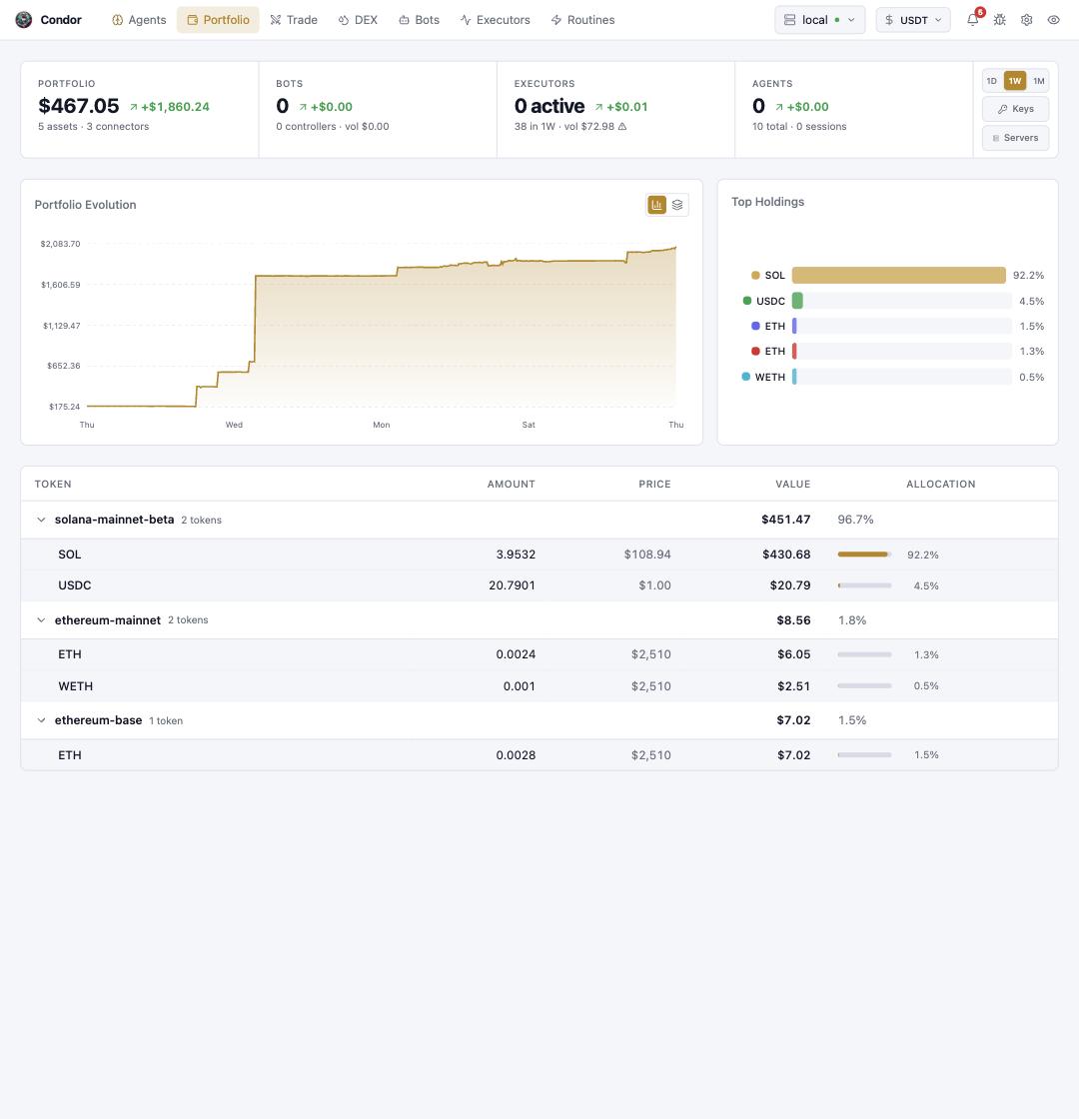
The **Portfolio** page is the one-glance answer to "what do I hold and how is it doing?" — aggregated across every account, exchange, and chain connected to the selected server.
 ## Reading the page
* **Stat strip** — total portfolio value with its change over the selected window, plus live counts for **Bots**, **Executors** (with week volume), and **Agents**. Each card is a shortcut into its page.
* **Time range** — the `1D / 1W / 1M` toggle (top right) drives the change figures and the chart. The **Keys** and **Servers** buttons jump straight to the matching [Settings](/webui/settings) tabs.
* **Portfolio Evolution** — your total value over time; the toggle switches between a single line and a stacked per-source view.
* **Top Holdings** — allocation bars for your largest tokens.
* **Token table** — every balance, grouped by network or connector (`solana-mainnet-beta`, `ethereum-mainnet`, …) with amount, price, value, and allocation. Groups collapse.
Balances come from the Hummingbot API server selected in the top bar — switch servers there to see a different account set. If a token or network is missing, check that its credentials or wallet are configured under [Settings → Keys and Wallets](/webui/settings#keys-and-wallets).
## Using Telegram
**`/portfolio`** renders the same dashboard as a message: total value with PNL indicators, token holdings with 24h changes, positions, LP positions, and open orders. Buttons drill into each connected connector (one per exchange or network), **🔄 Refresh** re-pulls live balances, and the settings flow changes the graph period (1d–30d).
## Using Hummingbot API
The page renders `POST /portfolio/state` — the same call works directly, and takes `account_names` / `connector_names` filters:
```bash theme={null}
curl -u YOUR_USERNAME:YOUR_PASSWORD -X POST http://localhost:8000/portfolio/state \
-H "Content-Type: application/json" \
-d '{"connector_names": ["binance", "hyperliquid_perpetual"]}'
```
`POST /portfolio/history` and `POST /portfolio/distribution` back the chart and the allocation views — see the [API reference](/api-reference).
## Learn more
* [Seeing Your Portfolio](/getting-started/portfolio) — first-run walkthrough
## Reading the page
* **Stat strip** — total portfolio value with its change over the selected window, plus live counts for **Bots**, **Executors** (with week volume), and **Agents**. Each card is a shortcut into its page.
* **Time range** — the `1D / 1W / 1M` toggle (top right) drives the change figures and the chart. The **Keys** and **Servers** buttons jump straight to the matching [Settings](/webui/settings) tabs.
* **Portfolio Evolution** — your total value over time; the toggle switches between a single line and a stacked per-source view.
* **Top Holdings** — allocation bars for your largest tokens.
* **Token table** — every balance, grouped by network or connector (`solana-mainnet-beta`, `ethereum-mainnet`, …) with amount, price, value, and allocation. Groups collapse.
Balances come from the Hummingbot API server selected in the top bar — switch servers there to see a different account set. If a token or network is missing, check that its credentials or wallet are configured under [Settings → Keys and Wallets](/webui/settings#keys-and-wallets).
## Using Telegram
**`/portfolio`** renders the same dashboard as a message: total value with PNL indicators, token holdings with 24h changes, positions, LP positions, and open orders. Buttons drill into each connected connector (one per exchange or network), **🔄 Refresh** re-pulls live balances, and the settings flow changes the graph period (1d–30d).
## Using Hummingbot API
The page renders `POST /portfolio/state` — the same call works directly, and takes `account_names` / `connector_names` filters:
```bash theme={null}
curl -u YOUR_USERNAME:YOUR_PASSWORD -X POST http://localhost:8000/portfolio/state \
-H "Content-Type: application/json" \
-d '{"connector_names": ["binance", "hyperliquid_perpetual"]}'
```
`POST /portfolio/history` and `POST /portfolio/distribution` back the chart and the allocation views — see the [API reference](/api-reference).
## Learn more
* [Seeing Your Portfolio](/getting-started/portfolio) — first-run walkthrough