> ## Documentation Index
> Fetch the complete documentation index at: https://condor.hummingbot.org/llms.txt
> Use this file to discover all available pages before exploring further.
# DEX
> Discover pools across DEXes, then chart, swap, and provide liquidity
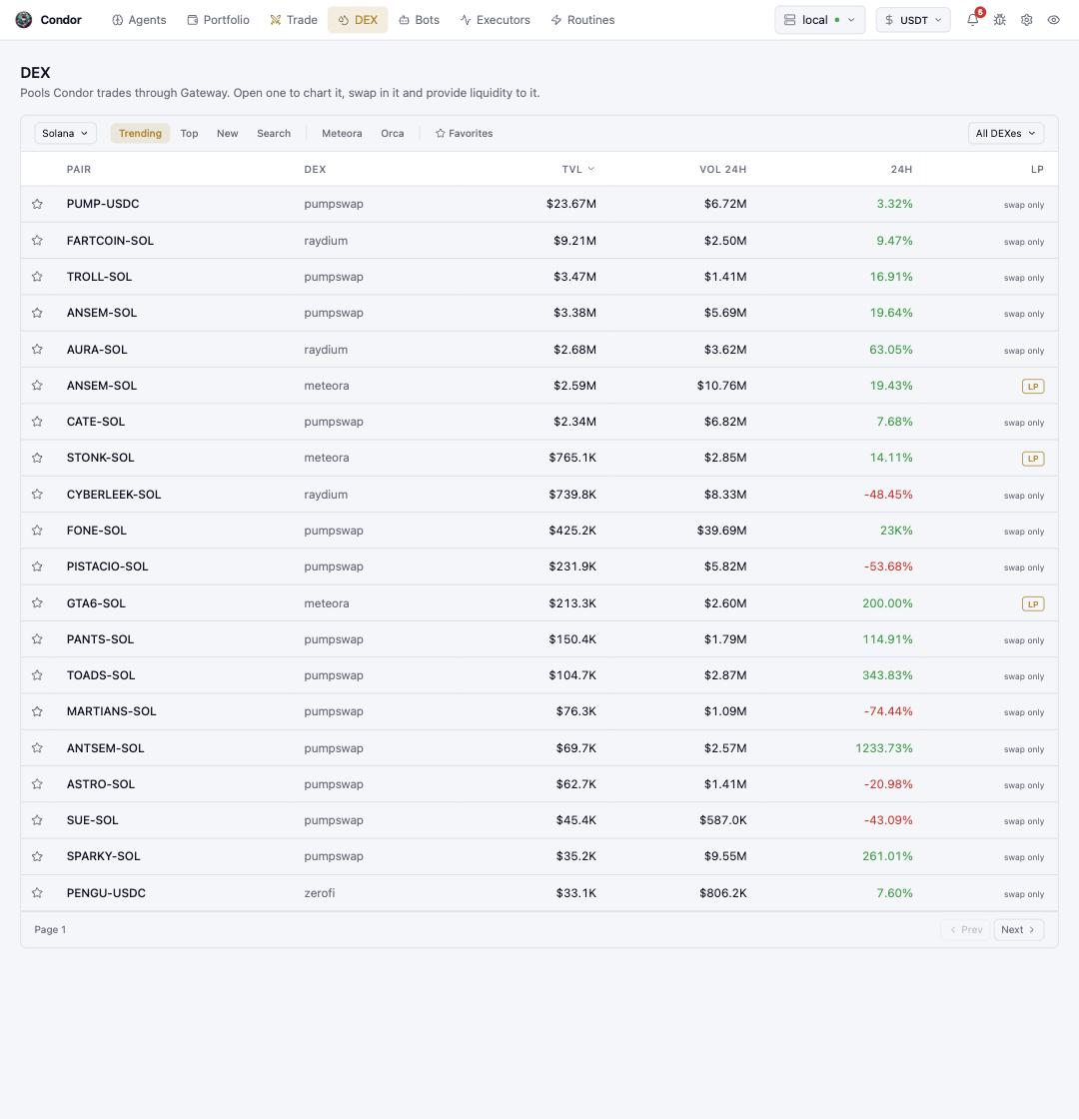
The **DEX** page is pool discovery: the pools Condor can trade through [Gateway](/webui/settings#gateway), ranked and filterable. Open a pool to chart it, swap in it, and provide liquidity to it.
 ## Navigating the list
* **Network selector** (left) — which chain you are browsing.
* **Trending / Top / New / Search** — ranking modes; **Search** finds a pool by token or address. The extra chips (e.g. **Meteora**, **Orca**) filter to one venue, and **All DEXes** narrows by protocol.
* **Favorites** — star a pool to pin it to your Favorites tab.
* **Columns** — TVL, 24h volume, and 24h price change, sortable. The right-hand badge tells you what Condor can do there: **swap only**, or **LP** for pools whose venue supports liquidity positions.
Market data comes from GeckoTerminal via Gateway; a pool doesn't need to be in Gateway's registry to show up here — Condor adds what it needs when you act on one.
## Inside a pool
Clicking a row opens the pool view: a price chart, a **swap** panel, and — on LP-capable venues — a **liquidity** panel where a concentrated-liquidity position's range is drawn and adjusted directly on the chart, then opened as an [LP Executor](/executors/lp-executor).
## Liquidity positions
Condor manages concentrated-liquidity (CLMM) positions on:
| Protocol | Chain | Type |
| -------------- | -------------- | ---- |
| **Orca** | Solana | CLMM |
| **Raydium** | Solana | CLMM |
| **Meteora** | Solana | CLMM |
| **Uniswap V3** | Ethereum, Base | CLMM |
A position's whole lifecycle lives in the pool view: open in a chosen range, watch its in-range status and uncollected fees, add or remove liquidity (fully or by percentage), collect fees without closing, and close. For positions an agent should supervise — automatic out-of-range handling, P\&L per agent — use the [LP Executor](/executors/lp-executor) instead of a bare position.
## Using Telegram
* **`/trade`** (or **`/swap`**) — the unified trading menu's DEX side: pick chain and tokens, **📊 Quote**, then **✅ Execute**, with slippage control and a quick-swap that repeats your last swap.
* **`/lp`** — the liquidity menu: **💱 Swap**, **💧 Liquidity Pools** with pool discovery and charts, **My Positions** (range, in-range status, uncollected fees), add or remove liquidity, and collect fees.
* **`/gateway`** — Gateway status and DEX connector configuration.
## Using Hummingbot API
The same operations are API calls under `/gateway/clmm/*` (`open`, `add`, `remove`, `collect-fees`, `positions_owned`) — see the [API reference](/api-reference/gateway). Classic full-range AMM liquidity has its parallel router under `/gateway/amm/*`, and pool discovery is `GET /gateway/clmm/pools`.
## Learn more
* [LP Executor](/executors/lp-executor) — agent-supervised positions
* [Gateway in the API reference](/api-reference/gateway) — the DEX middleware underneath, and its [Settings tab](/webui/settings#gateway)
## Navigating the list
* **Network selector** (left) — which chain you are browsing.
* **Trending / Top / New / Search** — ranking modes; **Search** finds a pool by token or address. The extra chips (e.g. **Meteora**, **Orca**) filter to one venue, and **All DEXes** narrows by protocol.
* **Favorites** — star a pool to pin it to your Favorites tab.
* **Columns** — TVL, 24h volume, and 24h price change, sortable. The right-hand badge tells you what Condor can do there: **swap only**, or **LP** for pools whose venue supports liquidity positions.
Market data comes from GeckoTerminal via Gateway; a pool doesn't need to be in Gateway's registry to show up here — Condor adds what it needs when you act on one.
## Inside a pool
Clicking a row opens the pool view: a price chart, a **swap** panel, and — on LP-capable venues — a **liquidity** panel where a concentrated-liquidity position's range is drawn and adjusted directly on the chart, then opened as an [LP Executor](/executors/lp-executor).
## Liquidity positions
Condor manages concentrated-liquidity (CLMM) positions on:
| Protocol | Chain | Type |
| -------------- | -------------- | ---- |
| **Orca** | Solana | CLMM |
| **Raydium** | Solana | CLMM |
| **Meteora** | Solana | CLMM |
| **Uniswap V3** | Ethereum, Base | CLMM |
A position's whole lifecycle lives in the pool view: open in a chosen range, watch its in-range status and uncollected fees, add or remove liquidity (fully or by percentage), collect fees without closing, and close. For positions an agent should supervise — automatic out-of-range handling, P\&L per agent — use the [LP Executor](/executors/lp-executor) instead of a bare position.
## Using Telegram
* **`/trade`** (or **`/swap`**) — the unified trading menu's DEX side: pick chain and tokens, **📊 Quote**, then **✅ Execute**, with slippage control and a quick-swap that repeats your last swap.
* **`/lp`** — the liquidity menu: **💱 Swap**, **💧 Liquidity Pools** with pool discovery and charts, **My Positions** (range, in-range status, uncollected fees), add or remove liquidity, and collect fees.
* **`/gateway`** — Gateway status and DEX connector configuration.
## Using Hummingbot API
The same operations are API calls under `/gateway/clmm/*` (`open`, `add`, `remove`, `collect-fees`, `positions_owned`) — see the [API reference](/api-reference/gateway). Classic full-range AMM liquidity has its parallel router under `/gateway/amm/*`, and pool discovery is `GET /gateway/clmm/pools`.
## Learn more
* [LP Executor](/executors/lp-executor) — agent-supervised positions
* [Gateway in the API reference](/api-reference/gateway) — the DEX middleware underneath, and its [Settings tab](/webui/settings#gateway)