> ## Documentation Index
> Fetch the complete documentation index at: https://condor.hummingbot.org/llms.txt
> Use this file to discover all available pages before exploring further.
# Agents
> The chat workspace: talk to Condor, delegate to expert agents, and run sessions
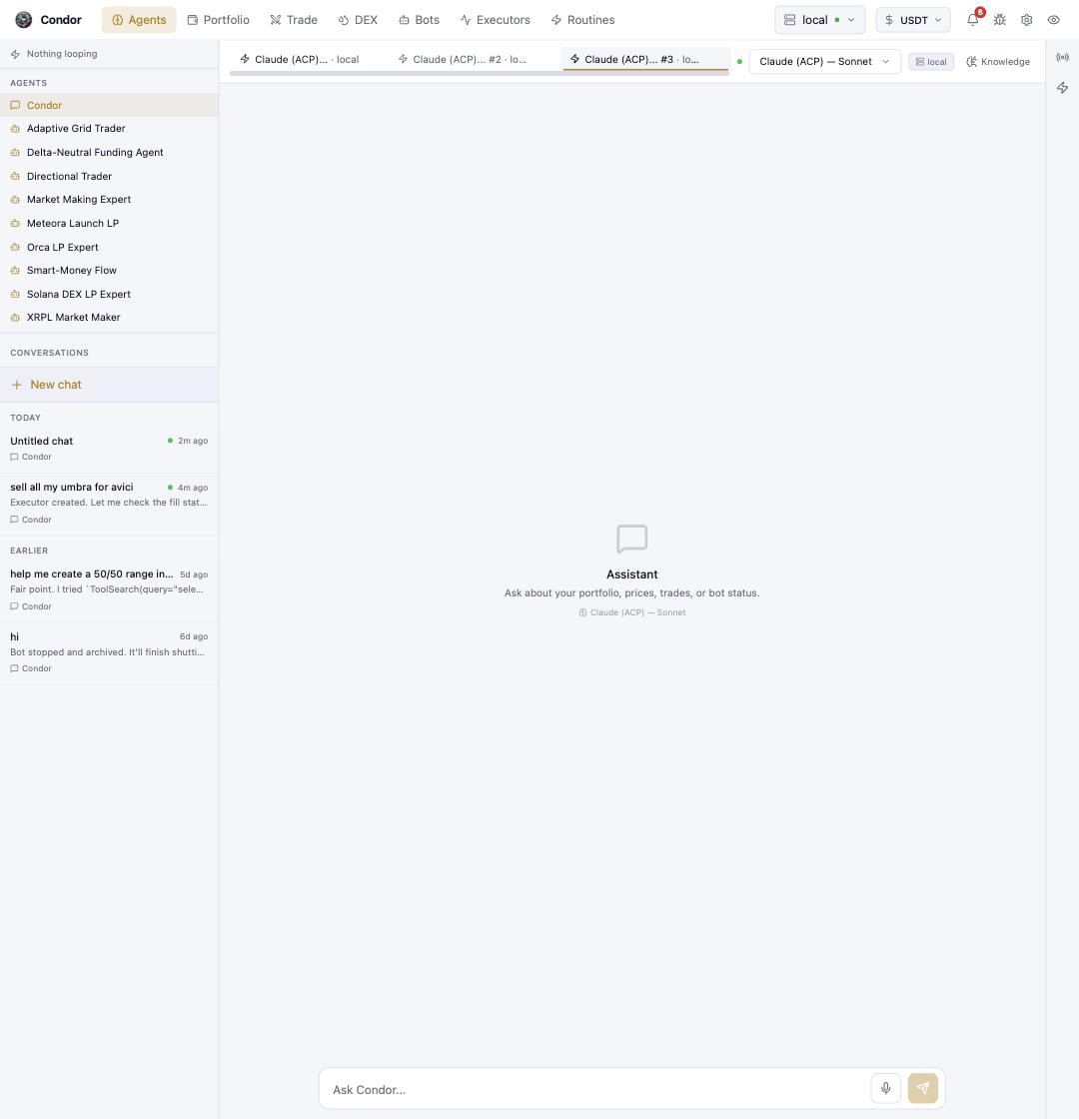
The **Agents** page is where you land when you open the dashboard — a chat workspace where you drive Condor in natural language, and where its expert agents do their work.
 ## The top bar
Every page shares the same chrome. Left to right: the seven page tabs (**Agents · Portfolio · Trade · DEX · Bots · Executors · Routines**), then the **server selector** (which Hummingbot API instance you are driving — the green dot is its health), the **quote currency** the UI prices things in, the **notification bell**, the **Report an issue** button, the **Settings** gear, and the **theme toggle**, which cycles dark → light → a color-blind-friendly mode.
## The agent rail
The left rail lists who you can talk to:
* **Condor** — the main assistant. It answers questions about your portfolio, prices, trades, and bot status, and delegates specialist work to the expert agents below it.
* **Expert agents** — domain specialists (market making, grid trading, LP strategies, funding rates, and any agent you build with [Agent Builder](/condor-agent/agent-builder)). Open one to chat with it directly, or let Condor delegate to it.
Below the agents, **Conversations** keeps your chat history grouped by day. **+ New chat** starts a fresh conversation; the status dot on a conversation means an agent is still working in it.
## The chat pane
Each open conversation is a tab across the top of the pane, so an agent can keep working in one tab while you talk in another. On the right of the tab strip: the **model picker** (which LLM this conversation thinks with — see [LLM Integration](/llm-integration)), the server badge, and **Knowledge** (documents the agent can draw on).
In the conversation itself, every agent reply carries its **Thought** and **Used N tools** disclosures — expand them to see exactly what the agent reasoned and which API calls it made before acting. Trades proposed by an agent arrive as a summary table with an explicit confirm step.
The message box at the bottom takes text or voice — the microphone transcribes locally with Whisper (configure it under [Settings → Voice & AI](/webui/settings#voice--ai)).
## Using Telegram
**`/agent`** opens the same assistant in a private chat — after that you just talk, and every message goes to Condor. The menu switches the model, **`/stop`** ends the running session, **`/delegations`** lists background tasks the agent is working through, **`/memory`** reviews what it has [remembered about you](/condor-agent/overview#memory--what-it-knows-about-you), and **`/web`** hands you a time-limited login link to this dashboard.
## Learn more
* [Trading Agents](/trading-agents/overview) — what agents are and how they execute
* [Build Your First Agent](/getting-started/first-agent)
* [Managing Sessions](/getting-started/sessions) — inspecting and stopping long-running agent sessions
## The top bar
Every page shares the same chrome. Left to right: the seven page tabs (**Agents · Portfolio · Trade · DEX · Bots · Executors · Routines**), then the **server selector** (which Hummingbot API instance you are driving — the green dot is its health), the **quote currency** the UI prices things in, the **notification bell**, the **Report an issue** button, the **Settings** gear, and the **theme toggle**, which cycles dark → light → a color-blind-friendly mode.
## The agent rail
The left rail lists who you can talk to:
* **Condor** — the main assistant. It answers questions about your portfolio, prices, trades, and bot status, and delegates specialist work to the expert agents below it.
* **Expert agents** — domain specialists (market making, grid trading, LP strategies, funding rates, and any agent you build with [Agent Builder](/condor-agent/agent-builder)). Open one to chat with it directly, or let Condor delegate to it.
Below the agents, **Conversations** keeps your chat history grouped by day. **+ New chat** starts a fresh conversation; the status dot on a conversation means an agent is still working in it.
## The chat pane
Each open conversation is a tab across the top of the pane, so an agent can keep working in one tab while you talk in another. On the right of the tab strip: the **model picker** (which LLM this conversation thinks with — see [LLM Integration](/llm-integration)), the server badge, and **Knowledge** (documents the agent can draw on).
In the conversation itself, every agent reply carries its **Thought** and **Used N tools** disclosures — expand them to see exactly what the agent reasoned and which API calls it made before acting. Trades proposed by an agent arrive as a summary table with an explicit confirm step.
The message box at the bottom takes text or voice — the microphone transcribes locally with Whisper (configure it under [Settings → Voice & AI](/webui/settings#voice--ai)).
## Using Telegram
**`/agent`** opens the same assistant in a private chat — after that you just talk, and every message goes to Condor. The menu switches the model, **`/stop`** ends the running session, **`/delegations`** lists background tasks the agent is working through, **`/memory`** reviews what it has [remembered about you](/condor-agent/overview#memory--what-it-knows-about-you), and **`/web`** hands you a time-limited login link to this dashboard.
## Learn more
* [Trading Agents](/trading-agents/overview) — what agents are and how they execute
* [Build Your First Agent](/getting-started/first-agent)
* [Managing Sessions](/getting-started/sessions) — inspecting and stopping long-running agent sessions